显示标签为“bmw icom”的博文。显示所有博文

2016年7月31日星期日

How to Connect BMW ICOM A2 with Wifi?

How to Connect BMW ICOM A2 with Wifi?

BMW ICOM A2+B+C Diagnostic & Programming Tool is with latest software, adapter and WIFI. It is the second generation of BMW ISTA Diagnose and programming system. BMW A2 is a best BMW ICOM. Many customers feedback that they do not know how to connect BMW ICOM A2 with Wifi. Here is the engineer's advice.

1. You should insert D-LINK to your computer.
2. You need to start your computer.
3. You'd better double click "ISPI-NEXT Admin Tools" shortcuts on your desktop, wait about 20 seconds until the software startup.
4. You should select "Wifi For ICOM", wait about 5 seconds until it ticks.
5. At this time, you can check Wifi connection in your phone, you will find Wifi name "ISAP" after D-LINK successfully startup.
6. You must connect "ICOM" to vehicle.
7. After "ICOM SYSTEM" light stop flashing, "WLAN" light will flash for several seconds then keep on, it means "ICOM" is successfully connected to the computer.

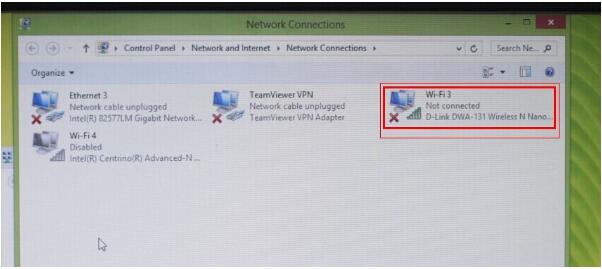
a.USB WIFI connection should be done as the following picture.
b.The computer comes with wifi off, or otherwise add wifi can not be opened, the computer can only have our equipment usb wifi, wired Ethernet port can not connect to the network, the device can not connect the network cable

c.After confirming all the tips, then you should turn on the computer.

d.After power on the laptop, you should confirm all net is off, and not connect to internet.
e.You'd better open the "BMW ICOM" software.
f. You need to conenct the cars with "ICOM A2" device, wait 20-60 seconds, then you can see the "WIFI" light on the device flash, or always on. This mean the wifi connect well.
g.You can start work with diagnostic, or programming.
h.This table cannot close, only can make it Minimum.
i.You should check the software can recognize the device.
It ends!

2016年7月25日星期一

BMW ICOM vs. SVDI, which one is suit for your car?

BMW  ICOM vs. SVDI, which one is suit for your car?

Referring to car diagnostic tool, we know BMW ICOM and SVDI. They are popular among engineers. SVDI VAG Commander is the newest car diagnostic adapter for VW/AUDI. It supports multi-languges. BMW ICOM is with latest Software, Adapter and WIFI . It is Second generation of BMW ISTA Diagnose and programming system.
How to choose a suitable car diagnostic tool for your car? Here is comparison between them below:

Item No.
TSS-0007
TSS-0114
Item Name
SVDI Diagnostic Interface
Software Version
V2015.3

VW, Audi, Skoda, Seat: V18
BMW: V9.6
TAG key tool: V5.8
SVDI Plugin Version: V2.3

Support Languages
English, German, Spanish, French, Italian, Polish, Portuguese, Turkish, Czech, Swedish, Dutch, Indian, Greek, Russian, Chinese, Japanese, Korean and Thai.
VW, Audi, Skoda, Seat Software Language Available: English, Simplified Chinese, German, Spanish, French, Russian, Italian, Danish, Czech, Bulgarian
TAG Key Tool Software Language Available: English
Support Car Model
BMW
VW,Audi,Skoda,Seat,BMW,TAG
Update
Dual-Core Processor, it is recommended that the I3 above.More than 4G of memory.Lenovo ThinkPad X200, X230, X230T, X61T, T410, X61,Dell D630, E49 etc
Send Software download link
Main Fuction
BMW testing and program, can not program key and ecu
VW,Audi,Skoda,Seat,BMW,TAG read error code,diagnose
Difference
BMW ICOM is original maintain programming diagnose tool,full functions, it can support part of SVDI function.

When you don't know how to choose the BMW ICOM and SVDI, you can visit this blog as your reference.