显示标签为“MB SD C4”的博文。显示所有博文

2016年7月15日星期五

I successfully installed rechargeable battery and Wifi Card for MB SD C4

I successfully installed rechargeable battery and Wifi Card for MB SD C4

MB SD Connect Compact 4 is a diagnostic tool and support multi-language. As we all know that  MB SD C4 can install battery and wifi card.But how to do? Now follow me as following steps:

1)You should prepare tools like these below:
①SDconnect multiplexer which need to input the batteries.
②6 units Ni-MH Rechargeable batteries,Size:AA, Voltage:1.2V,Capacity:above 1700mA.
③1 unit 108M WIFI Card.
④Plum screwdriver,Specification:T-20

2)You should take out the rubber:
a.You need to use the T20 Plum screwdriver to take out the screws as following picture:
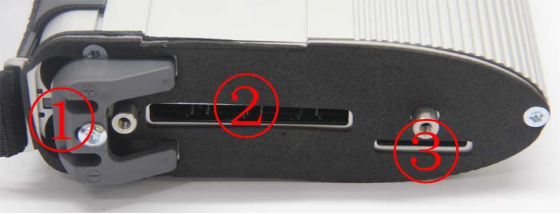
b.You should take out the rubber as below:
①Batteries Space.
②WIFI Card Space.
③SD Card Space.

3)You need to insert the rechargeable batteries.
a.You should use the T20 Plum screwdriver to take out the screws of Batteries Space fixation as following picture:
b.You can take out the fixation of Batteries Space. Pay attention to the Battery polarity marked in the Batteries Space.
c.You should insert the batteries. (Note the Battery polarity)
d.You'd better button on the Fixation of Batteries Space after inputting the Rechargeable batteries.
e.You need to use the T20 Plum screwdriver to fix the screws of Batteries Space fixation as below. And inserting the batteries is finished.

4)Here is the steps of installing WIFI Card for MB SD C4 below:
a. You'd better insert the WIFI Card into the WIFI Card Space. Please make the correct direction.

b.You should push it to make it totally connected.
c.You need to cover the rubber and fix the screws to finish all the work.

The rechargeable battery and Wifi Card for MB SD C4 is successfully installed.

2016年5月26日星期四

How to solve MB SD Connect C4 SD netControl "no signal" problem?

How to solve MB SD Connect C4 SD netControl "no signal" problem?

Since a few days ago, some customers told me that when they connect MB SD Concnect C4 with the computer,it showed that there was "no signal" error.


My customer's SD C4 information: 2015.12v MB SD C4 DAS Xentry software cannot work with 2013 SD connect c4 diagnostic system.

Operating system:Windows XP
Error Message:No signal
Self test results show bellow: 

ERROR:?Device?’100925?(2)’?isn’t?in?state?available

Device:?SDconnect/eCOM
Toolkit-Resultcode:?-1
Testresult:?0
Number?of?errors:?1
Number?of?warnings:?0

I taught him to do the operation bellow: 

1.You'd better run StartKeyCenter
2.You'd better take action to avoid Xentry reactivation
3.You'd better run Get Hardware ID
4.You'd better run EPC & WIS
5.You'd better add “license” to registry
6.You'd better run EPC & WIS with new password
7.You'd better take network setup
8.You'd better run SDconnect Toolkit
9.You'd better diagnose it.

The Install Video Instruction of MB SD C4:

2016年5月23日星期一

MB SD Connect Compact 4 2016.3 Star Diagnosis with Wifi for Cars and Trucks!

MB SD Connect Compact 4 2016.3 Star Diagnosis with Wifi for Cars and Trucks!

MB SD Connect Compact 4 support reading out & erasing trouble code,reading the real-time data of sensor and actuator, coding and programming. Also support wireless diagnose, support K line,CAN BUS and UDS protocol, with multi-language.Here I will show the highlights:

The Highlights of MB SD Connect Compact 4:

1.Support Wireless
2.Software Version:2016.3
3.Hardware Verison: OS:2.3 CSD:2.8
4.Supported Multi-Language:
English/Bulgarian/Danish/Greek/Spanish/French/Italian/Korean/Polish/Romanuan/Serb-Croatian/Turkish/Czech/German/Finish/Hyngarian/Japanese/Dutch/Portuguese/Chinese /Swedish
5.Support Offline and Online Programming

MB Star SD Connect C4 Wire Connection Display:


Notice:This MB SD C4 Can Not Be Used on IBM T30 Laptop.